Inside a Tier 3 Data Center
A room-by-room guide to the building behind a GPU-hour: what Tier 3 means, how power reaches the chip, how heat leaves, and what happens when the grid goes down
When you ask an AI model a question, the answer is generated by many expensive pieces of machinery working together in the physical world. This machinery is stored in a data center. An AI data center is a building full of graphics processors and the equipment that powers them, removes their heat, and connects them to other processors. A customer's prompt to an AI model goes over a network, a web of connections that lets machines share information. The AI model is the software system trained to generate outputs to AI users’ inquiries. 3,14,11
Training is the process of adjusting a model using examples so it can learn patterns. Inference is using that trained model to produce an answer. Both training and inference need computing equipment, but they put that equipment to work in different ways. 3
The whole process revolves around a central piece of hardware: the GPU, or graphics processing unit, a chip that can perform many calculations simultaneously. GPUs do a lot of the computation that is involved in AI training and inference. Servers are computers that run jobs, such as training an AI model, or provide services, such as responding to user requests. Storage is where a processor keeps information for later use, and working memory is where it keeps the information it’s actively using. GPUs also require connections to other processors and a building with power and cooling. The machinery surrounding the GPU is incredibly important because a GPU waiting for information or slowed down by excessive heat does less useful work than it could under suitable conditions, which is incredibly harmful to the profit margins of the owners of GPUs. 3,6,7,4
What Tier 3 Actually Means
Tier 3 is a data center classification. It references the building systems that support the GPUs, especially power and cooling. Tier 3 requires that each capacity component and distribution path supporting the data center infrastructure can be removed for planned maintenance or replacement without interrupting operations. This is called “concurrent maintainability,” which, in plain English, means maintenance can happen while the GPUs keep operating. Concurrent maintainability is incredibly important for AI data centers because data center operators want the facility to be running constantly in order to get the most return on their infrastructure investment. 1
A capacity component supplies part of a required service, such as a pump that moves cooling liquid or a power source that supplies electricity. A distribution path carries that service to the GPUs, such as electrical cables or cooling pipes. So, Tier 3 is about the machines that provide a service to the GPUs, and the routes that deliver it. 1,10
Coolant is a liquid that takes heat away from equipment. A valve is a device used to control or stop the flow of liquid through a pipe. To be able to service a pump safely, it has to be isolated from the operating system. But a spare pump won't help if the valves around the first pump also shut off coolant to the entire room. Staff need to isolate the pump while a different route continues to provide cooling. So the connections and valves are just as important as the number of pumps you have on hand. 1,30
Planned maintenance differs from an unexpected failure because when removal is planned, staff can ensure they have spare machinery and arrange another supply route before a planned shutdown. An unexpected failure may leave no time to prepare for suboptimal GPU output. Tier 3 does not guarantee that equipment failures or operating mistakes will leave GPU output unaffected. 1 If a data center had the ability to account for these unexpected issues, it would be considered a Tier 4 data center. The word for a data center’s ability to account for these unexpected errors is “fault tolerance.”
Choosing the Site and Arranging the Campus
Data center sites often resemble a warehouse complex and usually have the same few designated areas that make GPU output possible. An electrical yard is an outdoor area where equipment is located to receive and distribute power. Standby generators are an alternative source of power during an outage. The type of generator is often diesel, natural gas or an alternative source. Outdoor cooling equipment rejects heat collected from indoors in a process called heat rejection. Service roads provide access to these areas for staff, fuel deliveries and replacement equipment. 8,10,11,32
The data hall is the room that houses the racks that contain the GPUs and provide cooling, power and networking inputs to them. The power supply of a data center should have enough capacity not only for the processing units themselves, but also for the surrounding system. Depending on the cooling design, the site may also require a good water supply and a way to manage any water discharged from the system.
A plot of land may look well suited for a data center but still have limitations that prevent it from supporting one. An existing connection to the local electricity grid, for example, can make a site seem especially promising. But just because it’s connected doesn’t mean the grid is always able to provide the amount of power the proposed facility needs. The developers have to confirm with the utility how much electricity is really available and under what conditions it can be supplied. Just because you have electrical infrastructure in place doesn’t mean it can support a 24/7 data center. 8,32
The same problem can happen with network connections. A data center might purchase connections from two network providers so it can remain online while one is being serviced. Yet the two providers’ fiber cables could be running through the same underground conduit, even miles away from the facility. If a construction crew cuts both cables, the data center can lose both of its connections simultaneously. That's why developers need to verify where the cables actually run and if the two routes share any infrastructure. 9
The physical conditions of the site and the surrounding climate also matter. Flood risk can influence how high equipment must be placed and how water drains away from the property. Natural disaster risk may require equipment to be anchored so it does not shift or fall. Outdoor temperatures affect how effectively cooling equipment can release heat, so a system must be suited to the conditions it will face. 8,11,13
These examples raise a broader question: how much of the facility could be affected by one problem? Designers call that group of affected equipment or services a “failure domain.” In the above networking example, the shared connection puts both providers’ services within the same failure domain. Inside the building, a damaged cooling pipe might affect one rack, a row of racks, or the entire data hall, depending on what it serves and where valves can shut off the damaged section. Something that several systems rely on, such as that pipe or a shared cable route, is called a “shared dependency.” Identifying these dependencies helps designers see where separate systems could still be interrupted by the same maintenance work or failure. 1,9,30
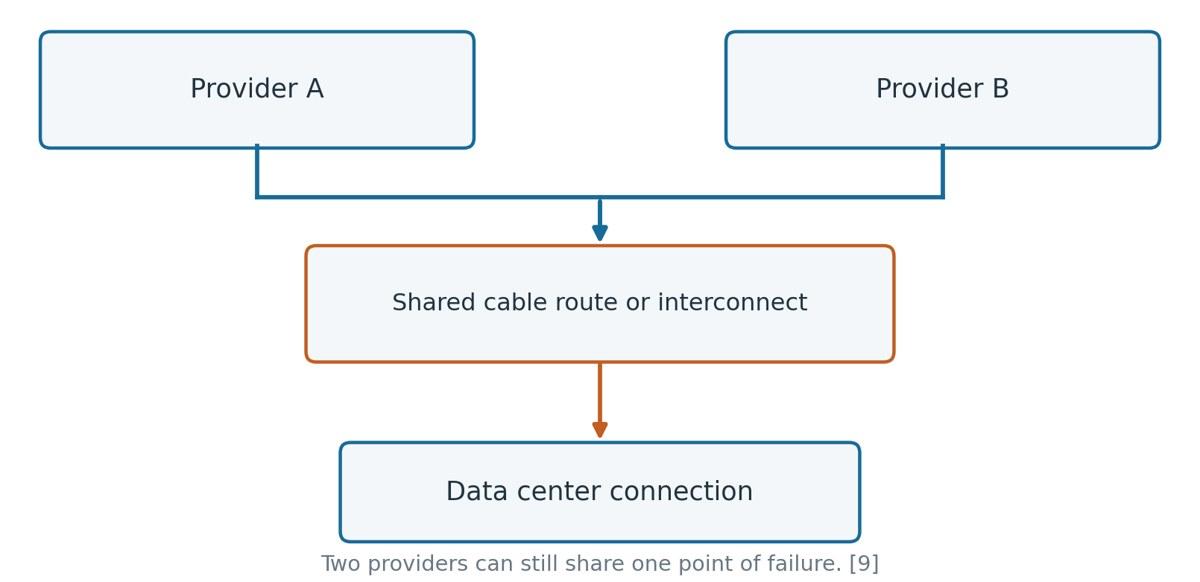
Shared dependencies in network connections
The Rooms Inside the Building
The rooms make more sense if you follow the job each one does. The computing happens through the GPUs, which are housed in the data hall. Electrical rooms receive, route and protect the electricity supply. Mechanical areas have equipment that moves cooling liquid or air and moves heat around. Network rooms connect the processing units to information inside and outside the building. Operations and receiving areas allow staff to monitor equipment, stage equipment (prepare it for installation), and store spare parts. 10,11,25
It is good to know four equipment names in Figure 1. A transformer changes the voltage. Voltage is the electrical push that pushes current (flow of electric charge) through a circuit (connected route). Switchgear is used to connect, disconnect and protect electrical paths. An uninterruptible power supply (UPS) is a device that uses stored energy, typically from batteries, to provide power to machinery when there is a power outage. A coolant distribution unit (CDU) controls the flow of coolant and the movement of heat in liquid-cooled equipment. 10,12,20
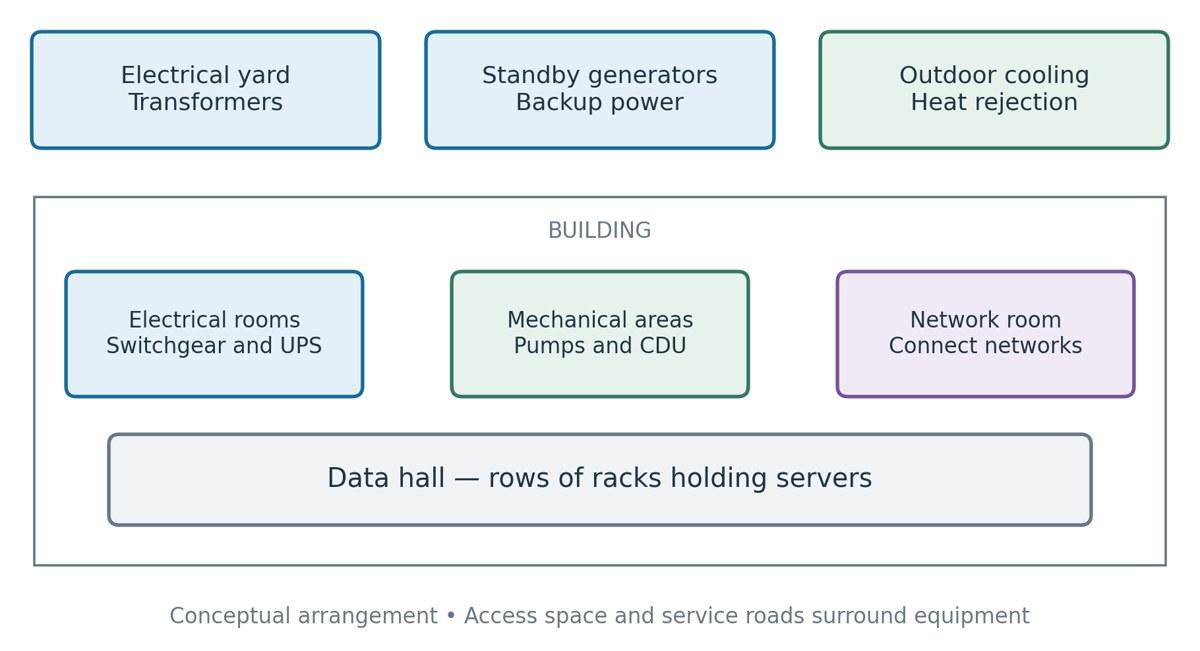
The Data Hall
There are rows of racks in the data hall. The GPUs are in each rack. The rack is powered by cables that carry electricity. Racks of GPUs are linked together by network cables with other racks of GPUs so they can all work together. The fans, the cooling liquid, or both carry away the heat from the equipment. So at each rack, power, networking, and cooling intersect. 6,10,13,25
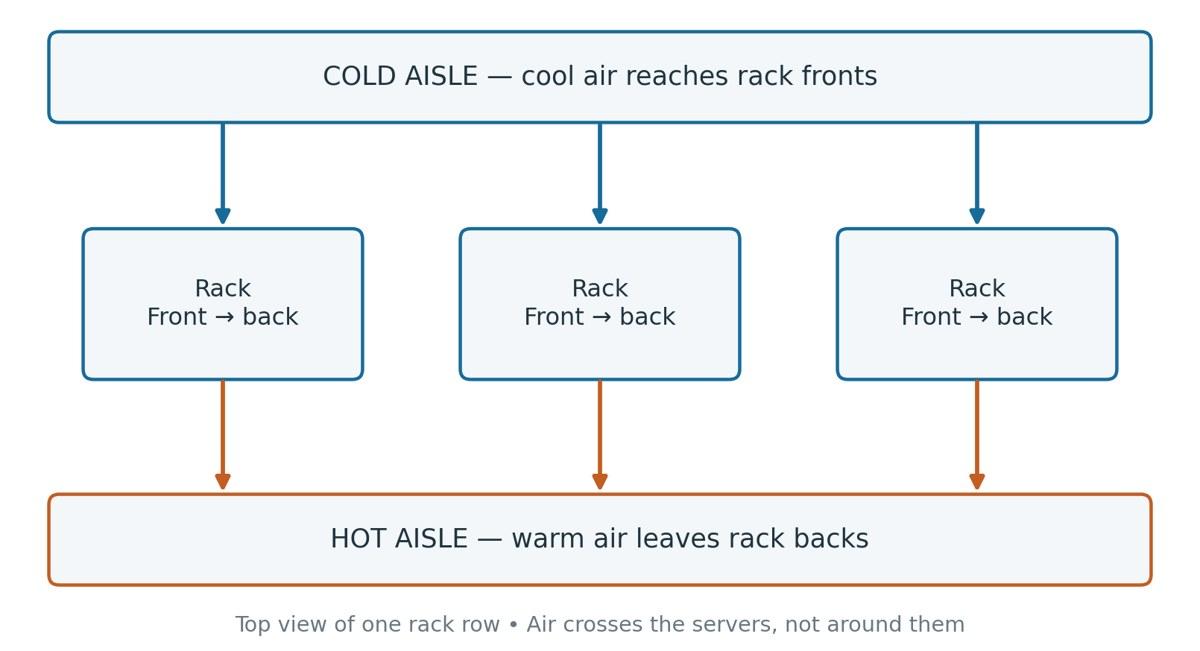
Aisles are the spaces between rows of racks and provide space for technicians to work on equipment. In a typical air-cooled system, rack fronts face a cold aisle that receives cool supply air. The rack backs are facing a hot aisle that receives the warm exhaust air from the GPUs. Separating these air streams helps prevent servers from sucking up their own hot exhaust. Some buildings route services below the racks under a raised floor; other buildings install racks right into the concrete floor of the data center, and all cooling, networking and electricity are found overhead. 11,6,10
Electrical rooms receiving and dividing the supply
An electric circuit is a connected path for electric current to flow through. A switchboard or switchgear contains connections, switches, and protective devices which divide an incoming supply into outgoing circuits. This is important for a data center because there are many areas in the facility that need to be constantly powered to keep it operational. 10,18,19
A circuit breaker removes a circuit from service when abnormal electrical conditions develop. One example of this is overcurrent, or too much current for the circuit to safely handle. A protective relay detects electrical problems and can tell a breaker to trip. Opening a circuit interrupts the conducting path, and current through that path will stop. These devices are used to help stop an electrical fault spreading. While the goal of an AI data center is to be running constantly, circuit breakers are important to interrupt excessive current that could damage expensive machinery. 10
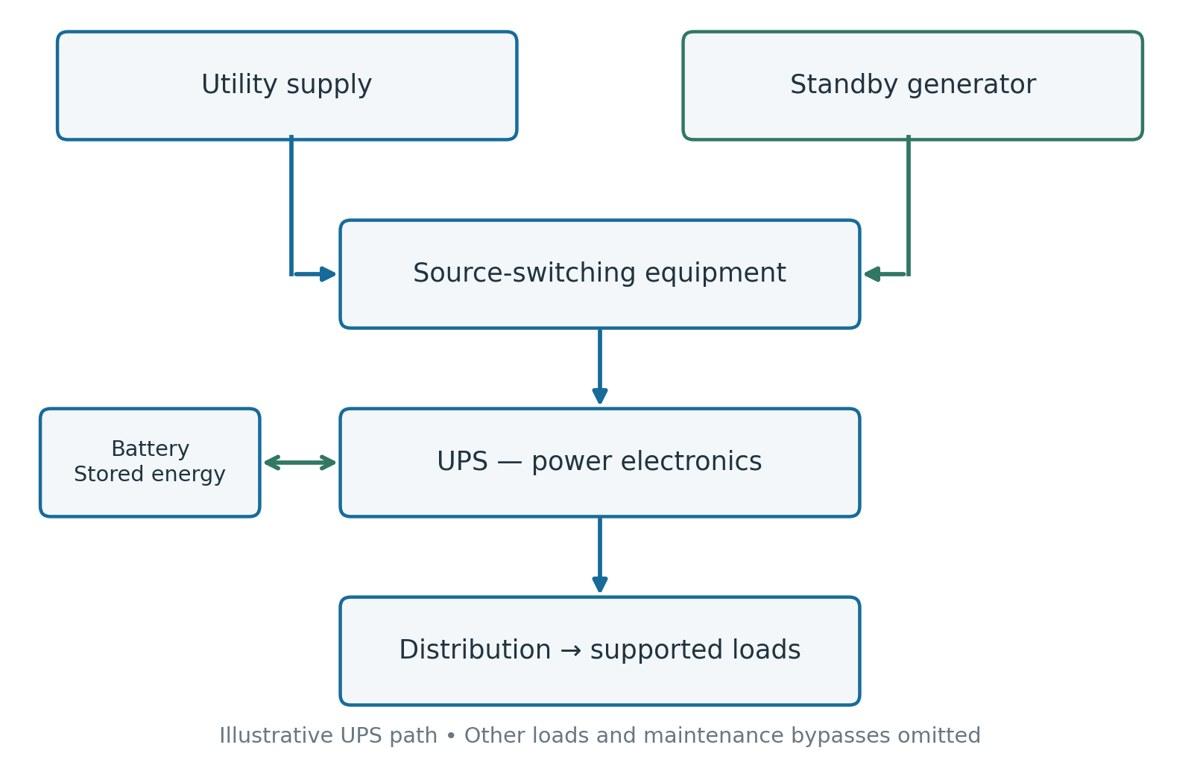
Transformers step the voltage of an electricity supply up or down and may be located either outside the main facility or in dedicated equipment rooms. An uninterruptible power supply (UPS) supplies power to equipment connected to it during an interruption in the normal power supply. It typically employs batteries to store energy and electronics for converting and controlling the electricity supply. Figure 3 shows the UPS being supplied by source switching equipment that decides between the normal electricity supply from the utility and a standby alternate power source on site. Electrical equipment generates heat, and so its rooms need to be ventilated or cooled down. 10,11,20,21
Once electricity reaches the data hall, it must be distributed across the rows of server racks. Rather than supplying every rack directly from one central point, the data center uses a series of electrical pathways to deliver power where it is needed. Diagram A illustrates how electricity moves from the building's distribution system to the individual server racks.
Diagram A. How power divides between racks
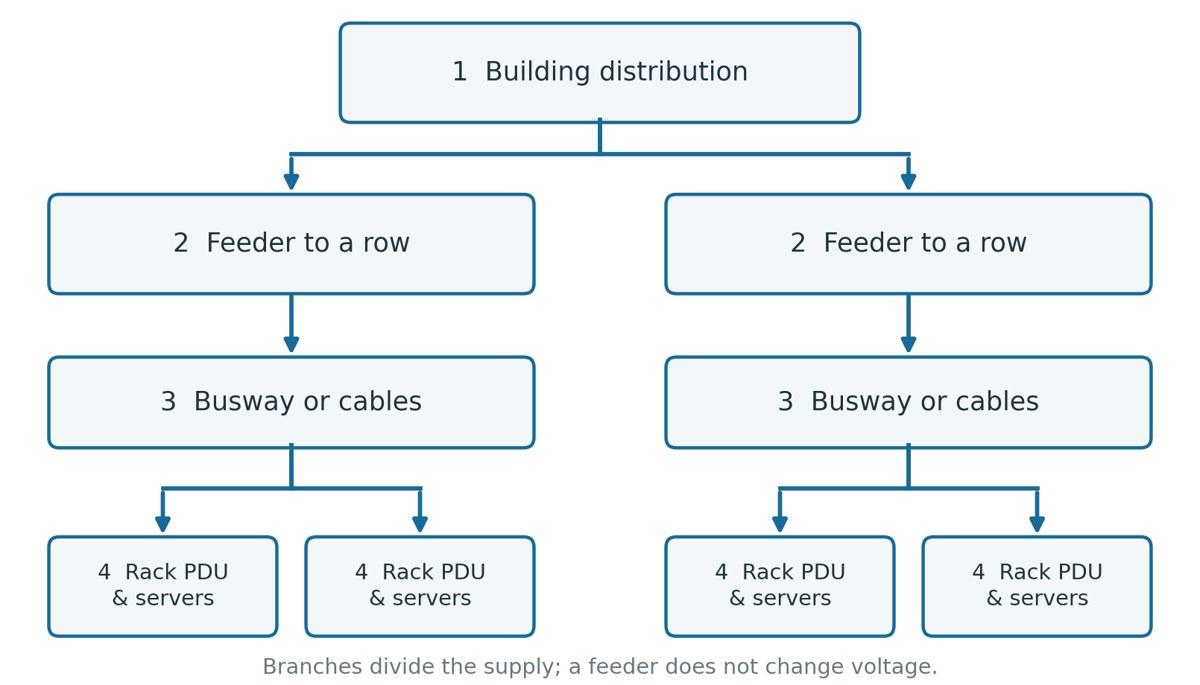
1. Building distribution. Receives a larger electrical supply and divides it among outgoing circuits. Think of this as the point where one supply becomes several routes through the building.
2. Feeder to a row. A feeder is a circuit carrying power onward to another distribution point. It supplies a group of equipment; it does not itself change the voltage.
3. Busway or cables. Electrical cables carry power toward the racks. Connections along a busway allow individual racks to be supplied.
4. Rack PDU and server. A rack power distribution unit (PDU) provides power connections inside the rack. 10,22
Mechanical Areas Moving Heat Away
Mechanical areas house equipment that moves coolant and transfers heat. Pumps circulate the liquid coolant to collect the heat, carry it to the cooling equipment and return it at a lower temperature. The path that the fluid takes is called a cooling circuit or loop. Pumps move the liquid, and the valves control or stop the flow. Filters catch unwanted particles. Sensors measure conditions like temperature and pressure so staff can check and adjust operation. 13,35
A heat exchanger is a device that transfers heat between two fluids without mixing them. In a plate heat exchanger, the two liquids flow through separate passages on opposite sides of thin metal plates. Heat goes through the metal into the cooler liquid. This lets an equipment loop serving the servers give its heat to a facility loop serving the building, without mixing the liquids. 12,13
Diagram B. What happens inside a heat exchanger
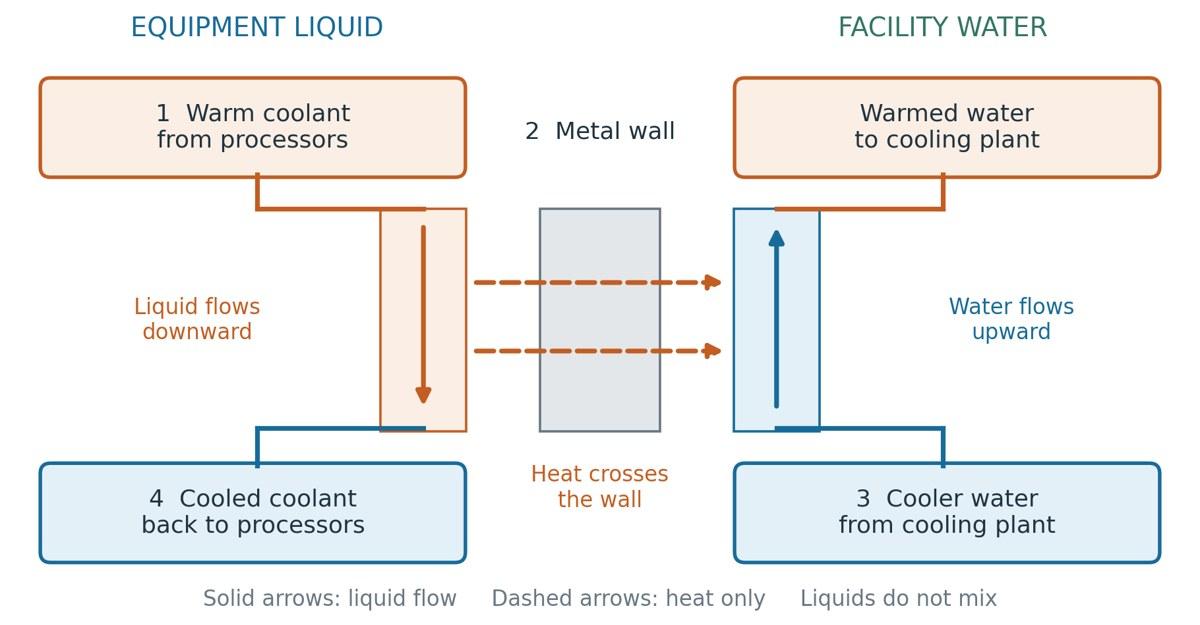
1. Warm equipment coolant. Liquid returning from the processors carries the heat collected at their components. It enters the equipment-side passage of the heat exchanger, shown on the left.
2. Metal separating surface. Thin metal surfaces keep the equipment coolant separate from the facility water. Heat passes through this metal from the warmer equipment coolant to the cooler facility water; the dashed arrows show heat transfer, not liquid flow.
3. Cooler facility water. Cooler water enters the separate passage on the right and absorbs heat through the metal wall. It leaves warmer and flows toward the cooling plant, which transfers the collected heat toward the outdoors.
4. Cooled equipment coolant. After releasing heat, the equipment coolant leaves the exchanger and returns to the processors to collect more. Pumps keep both liquids moving in their own circuits, so the fluids exchange heat without mixing. Sources 12,13
An air handler is a fan that moves room air. It may pass the air over a cooling coil, which is a set of tubes containing a cooler fluid. Heat moves from the air into that fluid, and then the cooled air returns to the servers. The tubes may contain chilled water or refrigerant, a fluid used to absorb and release heat in a refrigeration system. 11
The coolant distribution unit (CDU) manages coolant circulation and heat transfer for liquid-cooled equipment. The liquid-to-liquid CDU uses a heat exchanger to transfer heat from the equipment’s liquid loop to a separate facility liquid loop. A liquid-to-air CDU passes heat to the air in the room instead. CDUs may be located as close to the racks as possible or in a service area adjacent to the racks. 11,12
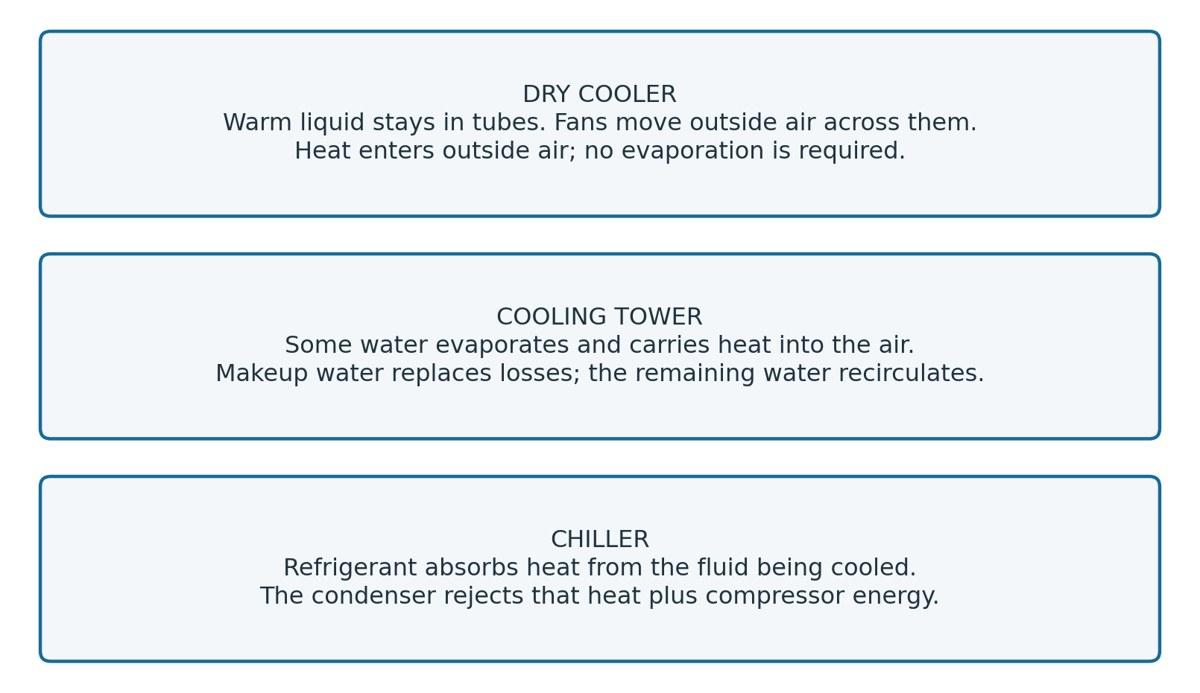
Cooling a server is more than simply moving heat away from it; the heat has to be expelled from the building eventually. This is known as “heat rejection.” A dry cooler blows outside air over tubes filled with warm fluid. A cooling tower cools down by evaporating some of the water. A chiller cools fluid with refrigeration and still requires equipment to dump the heat that it collected to the outside. The options are explained in further detail later on. 11,33,34
Network rooms bringing information in and sending it onward
The network room is where the building takes a customer’s prompt for an AI model and connects it to the GPUs inside. This information is carried over long distances on fiber optic cables. 15,25
A patch panel is a row of ports where cables that go through the building end. Then a technician plugs one of those cables into a network switch using a short cable that connects to the patch panel on one end and the switch on the other. If the connection needs to be changed later, the tech can move the short cable without having to re-route the longer cable through the building. A network switch is used to pass data from connection to connection on a network. A router is used to connect networks together and pass data toward its destination. 14,16
Network equipment should have its own power and cooling. If power is still flowing to the GPUs but isn’t flowing to the networking equipment, then jobs that depend on the failed network may stall or become unavailable. Service is dependent on the entire route, including any gear outside the server cabinet. 9,25
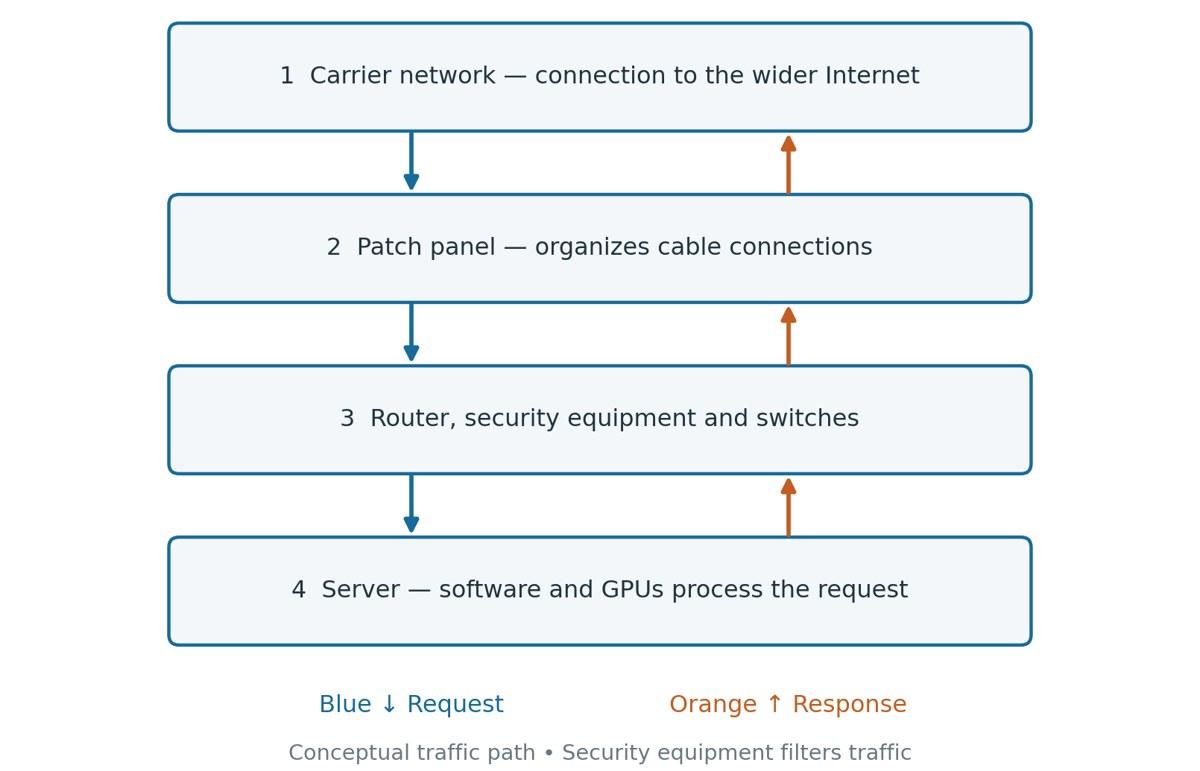
Diagram C. Three different jobs for the network
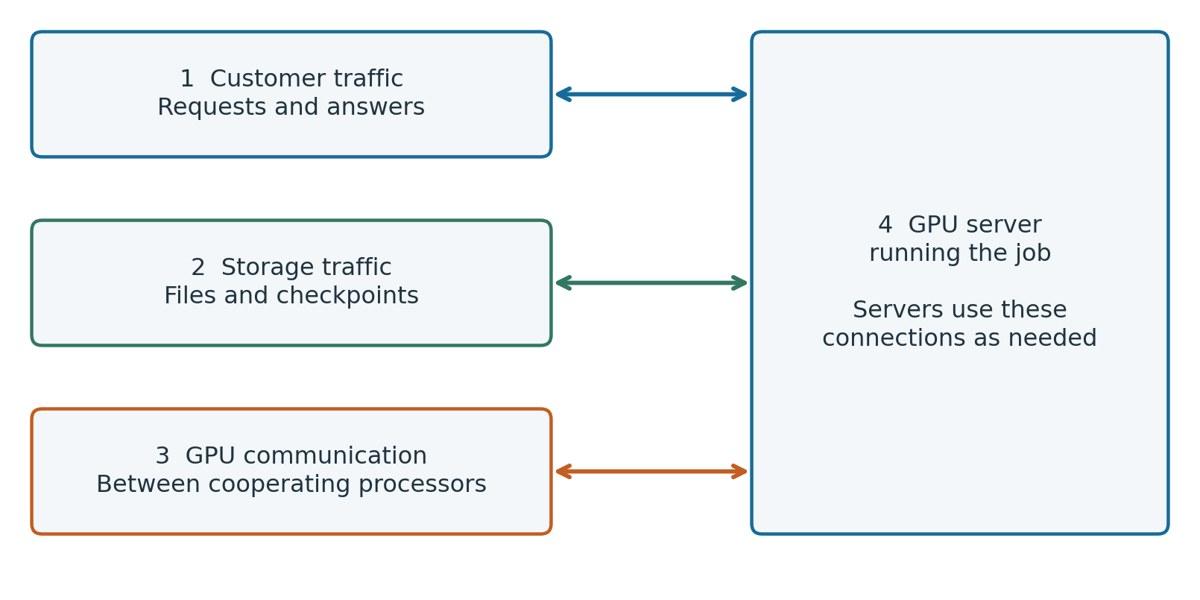
1. Customer traffic. Brings a user request into the service and carries the answer back. This is the route shown in Figure 4.
2. Storage traffic. Moves datasets (collections of examples or other data used for a task), saved models, and checkpoints (saved records of a job's progress) between storage equipment and servers. It supplies information for a job or saves information the job produces.
3. GPU communication. Carries information exchanged by cooperating processors. This can remain inside the facility without using the public Internet.
4. GPU server running the job. The GPU server is where these functions meet. It can receive a customer request, access stored files, and communicate with other machines as required by its workload. Sources 14,25,37
Where the Data Is Stored
Storage is used to save training datasets, saved models and results. Shared storage allows servers in different racks to access the same files over a network. Local storage is installed in or directly attached to a server. This allows a server to cache frequently accessed data and not have to pull the same files from shared storage repeatedly. 37
In training, servers read examples from storage and load them into working memory, so processors can use them. Servers also sometimes write a checkpoint to storage. A checkpoint records the progress of the job, so training can resume from the last saved point if interrupted. Slow arrival of examples can lead to idle processors and slow checkpoint writes can delay training. That’s why a system’s ability to keep up isn’t determined by storage capacity alone. 4,37
Diagram D. How stored data reaches a running job
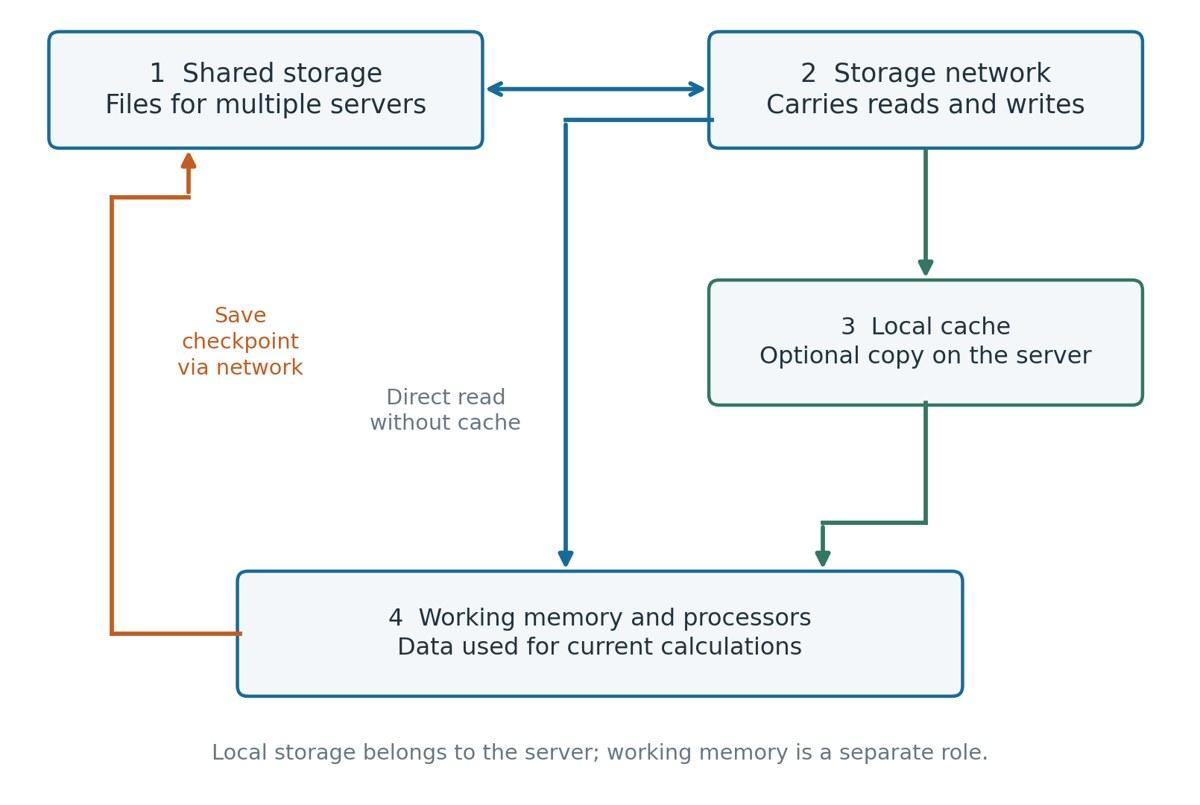
1. Shared storage. Holds files that multiple servers can access, such as datasets and saved models. Shared means the files can be reached by more than one server.
2. Storage network. Carries file reads and writes between storage equipment and servers. This route has to move data quickly enough for the jobs using it.
3. Local cache. Keeps a nearby copy of data that will be used again. A cache can reduce repeated trips to shared storage; it is optional, and jobs can also read directly from shared storage.
4. Working memory and processors. Data needed for current calculations is made available in working memory. Processing units use it to do the job. Saving a checkpoint writes a record of progress back to storage. Sources 37,4
How Electricity Reaches a GPU
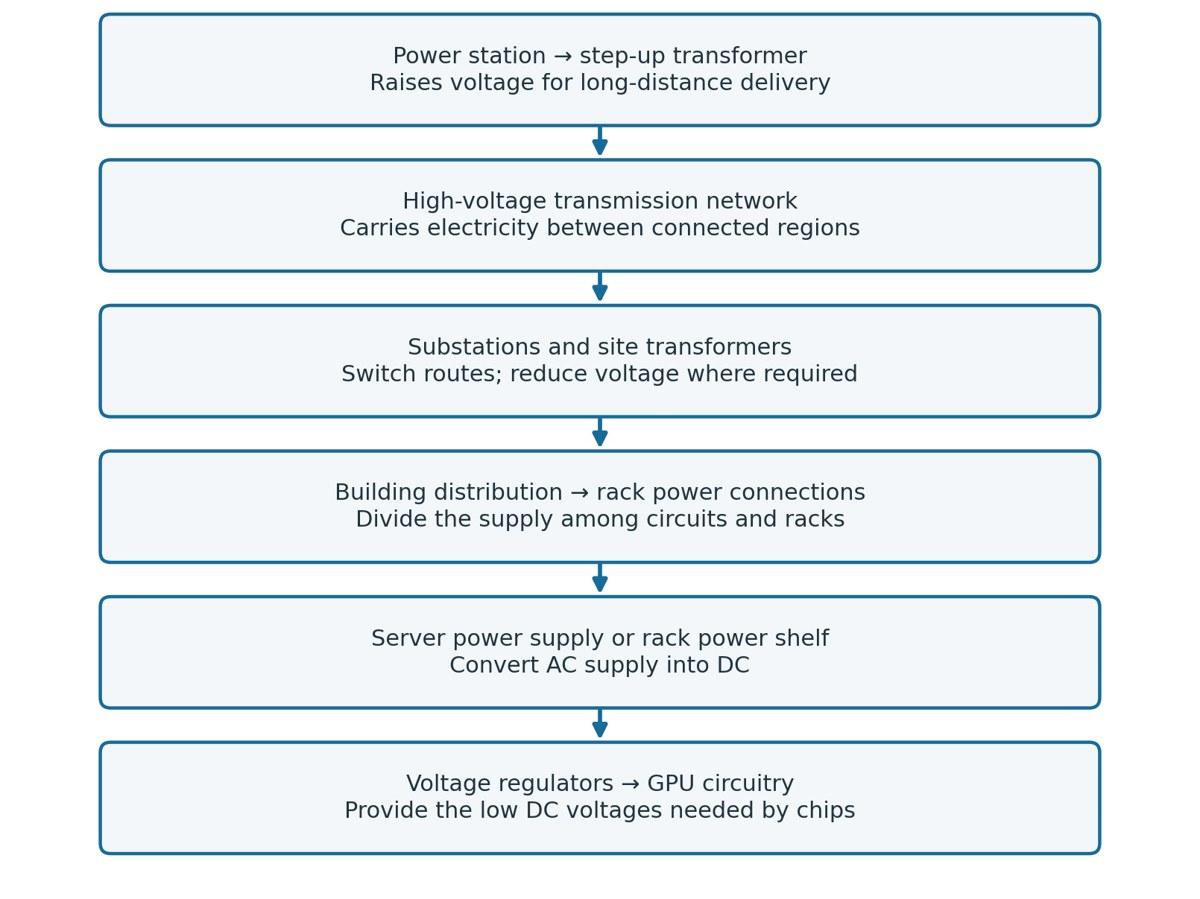
The electrical journey starts before the data center. The grid is the network of power stations, lines and equipment that delivers electricity to customers locally. A generator at a power station feeds the grid. Transmission lines carry power over long distances. Substations connect routes and often change voltage. Inside the data center, the supply is then divided into smaller circuits. There are electronic components inside each rack that convert and control electrical flow until the GPU gets the voltage it needs. 17,10,22
Obviously, power from a generator at the data center doesn’t have as far to travel as power from the grid. Instead of first sending power out onto the long-distance transmission grid, it sends power directly into the plant’s electrical system. 10,21
Facility Power and Computing Power
Power is the rate of transfer or conversion of energy. A watt (W) is a unit of power; a megawatt (MW) is 1 million watts and is the most common measure of data center electrical demand. The newest data centers are often being built to operate at gigawatts, or 1,000 megawatts. The IT load is the power consumed by servers, storage and networking equipment. The total facility load includes this, the power used by cooling equipment, electrical losses and other building services. For example, if a facility is using 12 MW at one time, 10 MW could be for the IT equipment and 2 MW could be for cooling, electrical losses, and other building services. 18,38
Energy measures use over time. If you use one kilowatt for one hour, you use one kilowatt-hour (kWh) of energy. Power usage effectiveness (PUE) = total energy to the facility / energy to IT equipment for the same period of time. It's the most common data center efficiency metric. If a facility uses 12 million kWh in total and its IT equipment uses 10 million kWh, its PUE is 1.2. That’s 0.2 units of supporting energy for every unit the IT equipment uses. 18,38
Raising Voltage for Transmission
A step-up transformer is used near the power plant to raise voltage for transmission. Transmission lines are used to transport large quantities of power over long distances. These are high-voltage and must be properly insulated. 17,19,10
The grid is not a dedicated cable from one chosen generator to one customer. It is a network. Power will flow on the available paths according to the electrical properties of the network and the pattern of generation and demand. A purchase contract doesn’t create a dedicated physical route from that plant to the buyer. 17,31
Substations and the Connection to the Data Center
A substation is a place where electrical equipment interconnects routes, switches circuits, and often changes voltage. When a lower voltage is required, the voltage is reduced to the level needed by the next part of the system by a step-down transformer. Regional distribution systems transmit power over shorter distances than transmission systems. Regional distribution systems are important because a large data center may be fed at a higher voltage than a typical commercial building and have a dedicated substation. 17,10
Inside the Building Dividing the Route
The switchgear and switchboard link the incoming supply to the outgoing feeders. A feeder is a circuit that supplies power to another point of distribution. Switching equipment can be placed on either side of a transformer depending on the design and voltage level. Smaller branch circuits go from here to specific groups of equipment. 10
A busway is a duct with conductive bars and connections along its length. It can feed power down a row of racks. A rack power distribution unit (rack PDU) provides connections for the rack’s equipment and monitors loads. 10
The Final Conversions Inside the Rack and Server
The normal power supply to the data center is alternating current (AC), where the current reverses direction again and again. The electronic circuits inside GPUs require direct current (DC), which flows in one direction. Server power supplies convert AC into DC. Another conversion near the processor provides the voltage needed by the GPUs. 11,22,23,19
A voltage regulator is an electronic circuit that controls voltage to keep it in the range that the processing units need. Close to a GPU, you have regulators that supply the low DC voltage. Memory and other parts may require different voltages. Low voltage does not necessarily mean low power. For DC, power is voltage multiplied by current. Thus, to transmit large amounts of power at low voltage, you need a high current. 22,18
High current produces heat losses in the conductors, the metal paths that carry electricity. To limit those losses, the highest-current paths are shortened. That is why the last voltage conversion happens close to the chip. Higher voltage enables the same power to be carried with less current for long-distance delivery. Transformers and electronic converters then reduce the supply and adapt it for the building, the servers and the processors. 18,19,22
What Happens When Utility Power Disappears
Often it takes generators a bit of time to start up before they can provide enough output to power a data center. That means if a data center unexpectedly loses power, the GPUs could shut down before a generator can kick in. That is why you often see batteries and generators working together. The battery system supplies power until the generator, which is a longer-term source of power, can be brought online. 10,20,21
A typical backup sequence starts when the electrical system detects a loss or unacceptable condition in the normal supply. The UPS carries its load as standby generators start up. Once the generator provides stable power at an acceptable voltage and frequency, the switching equipment connects the supported electrical system to the generator supply. In Figure 3, generator power reaches the equipment through the UPS, which stops drawing on its batteries once it accepts the generator supply. 10,21
The cooling system must also respond to an outage. Keeping GPUs powered is not enough if fans or pumps stop long enough for them to overheat. Some designs protect the power to cooling equipment; others also rely on stored thermal capacity, meaning the ability of available coolant or other material to absorb heat temporarily while cooling recovers. 24,11,30
Another controlled transition is the return to utility supply. Data center staff must confirm that conditions are acceptable, move the load as intended, replenish stored energy, and return the backup to a ready state. 21,20,2
Diagram E. Following a utility outage
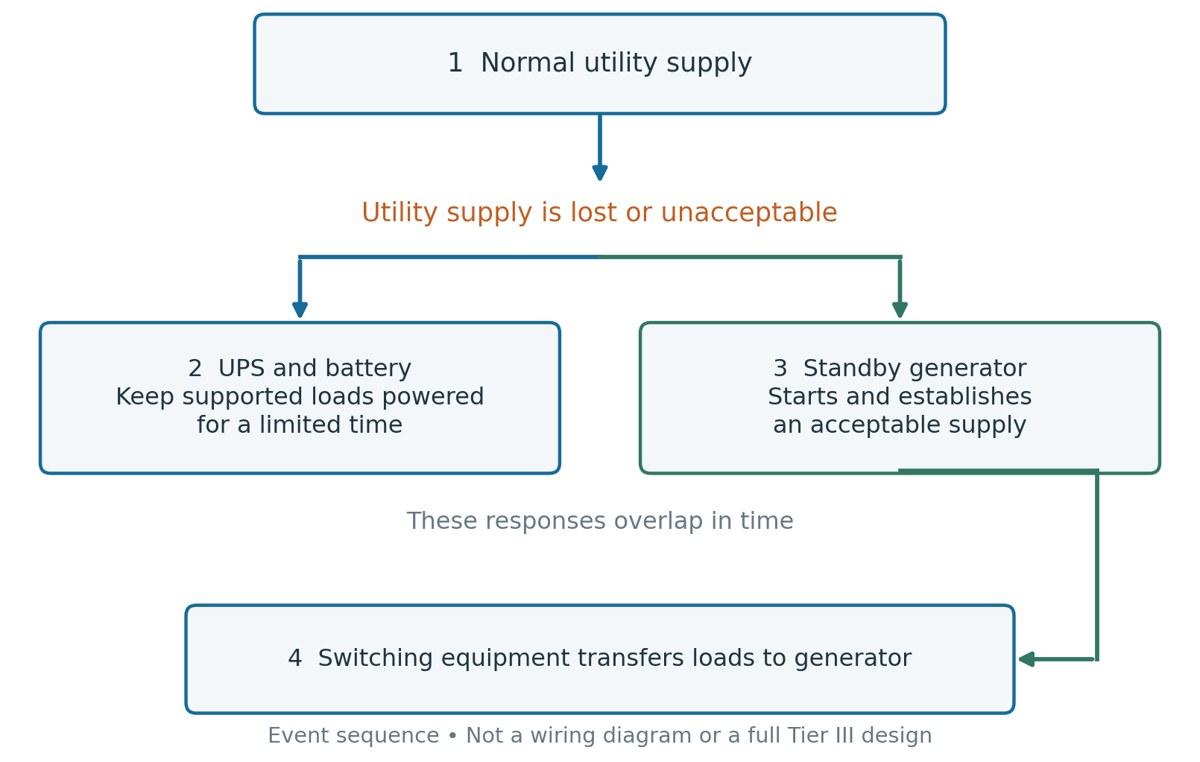
1. Normal utility supply. Under normal conditions, the utility feeds the supported electrical system.
2. UPS and battery. When the normal utility supply is lost, stored battery energy supports the connected load while another source becomes available. This support is only for a limited time.
3. Standby generator. The engine starts and the generator establishes an acceptable electrical supply.
4. Transfer to generator supply. Switching equipment connects the intended loads to the generator in the designed sequence. Sources 10,20,21,24
How Heat Leaves the Building
Imagine the hot air coming out of a laptop when it is working hard. A data center has the same basic problem of heat removal, but on a much bigger scale. GPUs consume electricity. Almost all of that electricity becomes heat. Cooling has to take that heat off the processors and get it out of the system. So the two main focuses are collecting the heat at the GPUs and disposing of it from the facility.
In an air-cooled system, fans blow air over heat sinks attached to hot components. A heat sink is a piece of metal that spreads heat over a larger area so that the moving air can carry it away. Cool supply air flows into the rack fronts from the cold aisle and warm exhaust air flows out of the rack backs into the hot aisle. Containment means barriers that do not allow the air streams to mix. But servers can still overheat even if the room temperature seems acceptable, if they are not getting cool air, or if hot exhaust air gets back into their air inlets. 11,6
Diagram F. Following the air-cooling loop
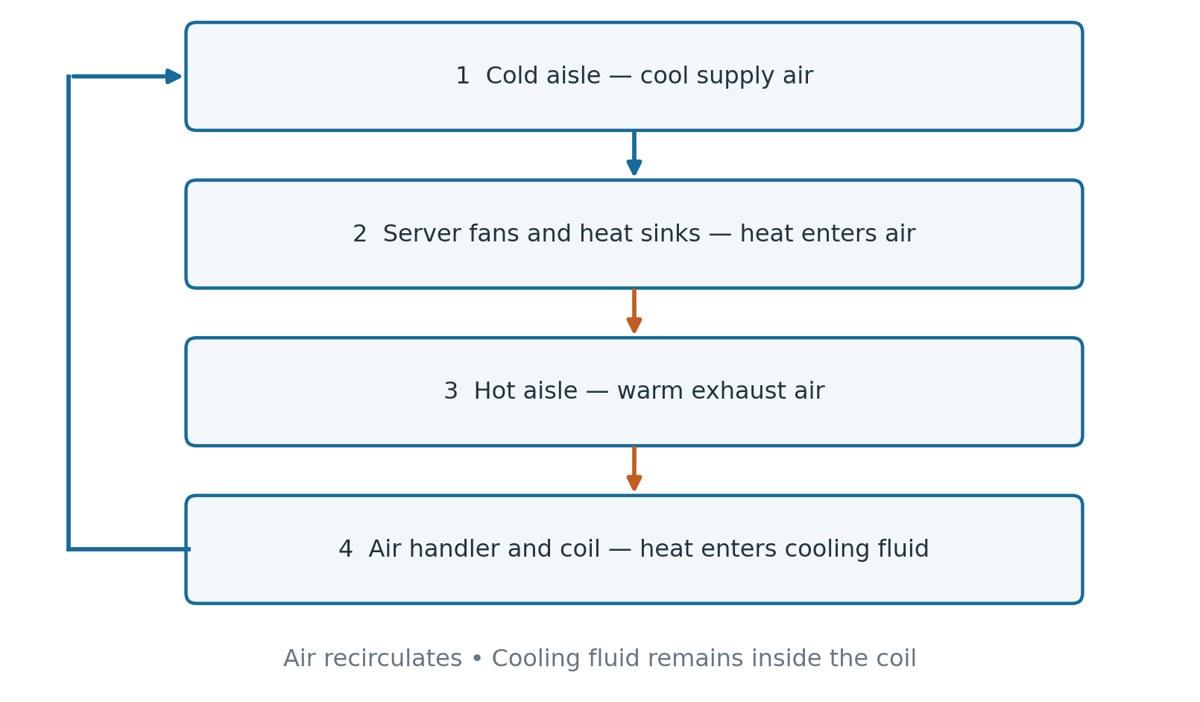
1. Cold aisle. Cool supply air reaches the fronts of the racks. This aisle supplies air to the equipment.
2. Server fans and heat sinks. Fans move air through the server. Heat sinks provide surfaces that transfer component heat into that moving air.
3. Hot aisle. Warmer air leaves the backs of the racks. Keeping it from mixing with supply air helps prevent warm exhaust from returning directly to server inlets.
4. Air handler and cooling coil. The air handler moves return air across a coil containing a cooler fluid. Heat passes into that fluid, and cooled air returns to the supply side. The fluid carries the collected heat onward for outdoor rejection. Sources 6,11,33
Direct liquid cooling uses cold plates. These are metal plates that are attached to hot components. The plates have paths inside them for the coolant to flow through. The heat passes from the component, through the plate and into the liquid. The heated equipment coolant is circulated to a CDU in a liquid-to-liquid configuration, where it transfers its heat to a separate facility loop. Other components may still need fans and room air to cool them. 12,30
The cooling plant is the set of equipment that cools down the circulating fluid of the facility and directs the heat toward the outdoors. Its capacity is only useful if the fluid arrives at the racks at the correct flow and temperature. Pipes carry the fluid, pumps move it, and manifolds are junctions where flow is split or gathered across multiple connections. Valves control and isolate lines. 11,13,35
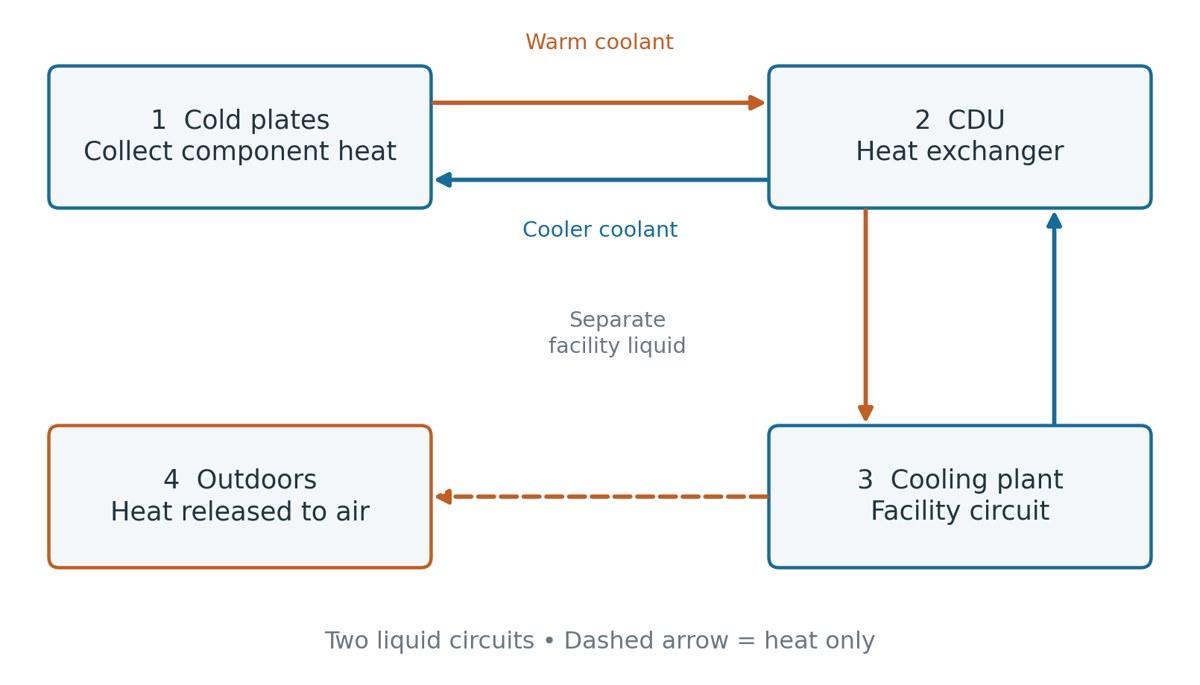
Figure 7 shows three methods of heat removal. Dry coolers use fans to blow air from outside across tubes containing warm liquid. The heat is transferred into the air, and the fluid stays in the tubes. Cooling towers allow some water to evaporate, from liquid to vapor, taking heat with it. Replacement water, called makeup water, replaces the evaporated water. A chiller is a machine that uses electricity to move refrigerant through a cycle that absorbs heat from the fluid being cooled and releases it elsewhere. Its condenser is the part that releases that heat to air or to another water circuit. It also releases the heat from the energy used by the compressor, the part that raises the pressure of the refrigerant gas. They have different requirements for electricity, water and the outdoor temperature. Having liquid cooling at the chip does not automatically require evaporative cooling on the outside. 11,33,34
Software Turns Equipment into a Service
Even powered equipment needs instructions and a job. This is made possible by software and applications. A scheduler is a piece of software that maps computing jobs to available resources, such as GPUs and memory. But a job that requires eight GPUs with the right connections can’t just use eight idle GPUs spread across different racks, because they must also have the memory, connectivity, and software configuration it requires to complete the task. Consequently, a facility could have idle equipment while a customer is waiting for the right resources to be available. 26,5
Drivers give applications access to hardware such as GPUs. Software libraries provide reusable code so that each application does not need to build every calculation from scratch. Containers bundle an application and the software required to run it, simplifying the replication of the operating environment. Monitoring software reports on health and performance of equipment. These layers determine if the hardware is available for a job, if it can be used efficiently and if it can be released once the job is done. 26,27,7
A training run needs to find a suitable group of GPUs with the right connectivity and memory. The application reads data, performs calculations, exchanges results, and periodically saves its progress. If the server crashes, a job can be resumed from a checkpoint. This can happen even if a building’s power and cooling systems are operating as designed. 4,26
An inference service can have multiple replicas (different copies of the model running). Its serving system can load balance requests across available replicas. If one instance is down, the serving system can redirect traffic to healthy replicas, which need enough spare capacity to handle the additional requests without unacceptable delays or errors. The building contains the services the computers rely on. The application or its serving platform must provide mechanisms to handle a failed machine. Both are relevant for the customer waiting for an answer. 3,28,5
[DISCLOSURE]
Published by Rheostat for informational purposes only. Generative AI tools were used in the preparation of this paper. All final content, arguments, and data have been reviewed and edited by the author. This paper is not an offer, solicitation, or recommendation to transact, and is not investment, legal, tax or accounting advice. Market data is drawn from public sources including issuer filings and press releases.
[REFERENCES]
Sources
1 Uptime Institute. Tier Certification Overview Tier III and Tier IV; certification scope https://uptimeinstitute.com/tier-certification/
2 Uptime Institute. Tier Certification Operational Sustainability Staffing, maintenance, operations, and planning https://uptimeinstitute.com/tier-certification/operations
3 NVIDIA. What Is AI Inference? Training versus inference; distributed inference https://www.nvidia.com/en-us/glossary/ai-inference/
4 PyTorch. Getting Started with Distributed Data Parallel Skewed Processing Speeds; Save and Load Checkpoints https://docs.pytorch.org/tutorials/intermediate/ddp_tutorial.html
5 vLLM. Parallelism and Scaling GPU memory, tensor parallelism, and multi-node serving https://docs.vllm.ai/en/stable/serving/parallelism_scaling/
6 NVIDIA. Introduction to NVIDIA DGX H100/H200 Systems Hardware Overview; Mechanical, Power, and Environmental Specifications https://docs.nvidia.com/dgx/dgxh100-user-guide/introduction-to-dgxh100.html
7 NVIDIA. NVIDIA System Management Interface Clock Event Reasons; thermal slowdown; power readings https://docs.nvidia.com/deploy/nvidia-smi/
8 Wendy Torell, Schneider Electric. Site Selection for Mission Critical Facilities White Paper 81, revision 2; geographical hazards, utility capacity, water, fuel, equipment access, and building risks. https://download.schneider-electric.com/files?p_Doc_Ref=SPD_SADE-5TNRPW_EN&p_File_Name=SADE-5TNRPW_R2_EN.pdf
9 Lumen. Enable network resiliency Physical route diversity and shared conduits https://www.lumen.com/en-us/solutions/enable-network-resiliency.html
10 Pearl Hu, Schneider Electric. Electrical Distribution Equipment in Data Center Environments White Paper 61, revision 2; electrical architecture and equipment, pp. 2–11. Example architecture, not a universal wiring design. https://download.schneider-electric.com/files?p_Doc_Ref=SPD_VAVR-8W4MEX_EN&p_File_Name=VAVR-8W4MEX_R2_EN.pdf
11 Otto Van Geet and David Sickinger, U.S. Department of Energy / NREL. Best Practices Guide for Energy-Efficient Data Center Design Revised July 2024; sections 3–6, environmental conditions, air management, cooling, and electrical systems https://www.energy.gov/sites/default/files/2024-07/best-practice-guide-data-center-design_0.pdf
12 Vertiv. Understanding Coolant Distribution Units (CDUs) for Liquid Cooling 8 February 2023; closed loops, heat exchange, filters, flow, and temperature control https://www.vertiv.com/en-latam/insights/articles/educational-articles/understanding-coolant-distribution-units-cdus-for-liquid-cooling/
13 Vertiv. XDU1350 Coolant Distribution Unit Application and Planning Guide SL-71309, XDU1350B; sections 3–4 and circuit drawings. Product-specific example of circuits, valves, sensors, pumps, and a plate heat exchanger. https://www.vertiv.com/4a2505/globalassets/shared/vertiv-liebert-xdu1350-coolant-distribution-unit_application-and-planning-guide_sl-71309.pdf
14 Cisco. What Is Network Switching? Switches, routers, and packet forwarding https://www.cisco.com/site/us/en/learn/topics/networking/what-is-network-switching.html
15 Cisco. What is Optical Networking? Fiber and optical transmission fundamentals https://www.cisco.com/site/us/en/learn/topics/networking/optical-networking.html
16 Cisco. Installing Cisco ONS 15454-PP-4-SMR Patch Panel Passive optical connections; a product example, not a requirement for data centers https://www.cisco.com/c/en/us/td/docs/optical/spares/dwdm/guides/15454_Patch_Panel.html
17 U.S. Energy Information Administration. How electricity is delivered to consumers Transmission, distribution, substations, and interconnected grids https://www.eia.gov/energyexplained/electricity/delivery-to-consumers.php
18 OpenStax. University Physics Volume 2, Section 9.5 Electrical Energy and Power Power, energy, voltage-current relationship, and resistive heating https://openstax.org/books/university-physics-volume-2/pages/9-5-electrical-energy-and-power
19 OpenStax. University Physics Volume 2, Section 15.6 Transformers Induction, turns ratio, voltage/current conversion, and transmission losses https://openstax.org/books/university-physics-volume-2/pages/15-6-transformers
20 Eaton. Choosing the optimal UPS topology Online UPS and double-conversion operation https://www.eaton.com/us/en-us/products/backup-power-ups-surge-it-power-distribution/backup-power-ups/choosing-the-optimal-ups-topology-.html
21 Eaton. Automatic transfer switches (ATS) fundamentals Utility-generator arrangements; transfer sequence; open and closed transitions https://www.eaton.com/us/en-us/products/low-voltage-power-distribution-control-systems/automatic-transfer-switches/automatic-transfer-switch-fundamentals.html
22 Vicor. Vicor modules support the data center infrastructure highlighted by Google at Open Compute Summit 10 March 2016; 48 V and 12 V distribution; low-voltage CPU/GPU supplies and current-related losses https://www.vicorpower.com/press-room/modules-support-data-center
23 NVIDIA. BCM Power Shelf Integration Power shelves containing multiple power supply units; platform-specific example. https://docs.nvidia.com/base-command-manager/product-manuals/11/nvidia-mission-control/powershelf
24 Uptime Institute. Accredited Tier Designer Technical Paper Series Continuous Cooling Abstract; continuous cooling is a Tier IV requirement and a separate design consideration at other tiers https://uptimeinstitute.com/resources/asset/accredited-tier-designer-technical-paper-series-continuous-cooling
25 NVIDIA. Network Fabrics DGX SuperPOD H200 Reference Architecture; compute, storage, in-band, and out-of-band networks https://docs.nvidia.com/dgx-superpod/reference-architecture/scalable-infrastructure-h200/latest/network-fabrics.html
26 Kubernetes. Schedule GPUs GPU resource requests, device plugins, node labels, and affinity https://kubernetes.io/docs/tasks/manage-gpus/scheduling-gpus/
27 Kubernetes. Containers Container images and packaged application dependencies https://kubernetes.io/docs/concepts/containers/
28 Kubernetes. Service Service endpoints and access to changing sets of application instances https://kubernetes.io/docs/concepts/services-networking/service/
30 U.S. Department of Energy, Federal Energy Management Program. Sandia’s Liquid-Cooled Data Center Boosts Efficiency and Resiliency 2021 case study; residual air cooling and redundant CDU/valve arrangement https://www.energy.gov/sites/default/files/2021-07/Sandia-liquid-cooled-data-center.pdf
31 Federal Energy Regulatory Commission. Reliability Primer Transmission and interconnected power flow. The contract-versus-physical-route distinction in the text is an explanatory inference. https://www.ferc.gov/sites/default/files/2020-05/reliability-primer.pdf
32 Schneider Electric. Selecting a Site for a Mission Critical Data Center 10 January 2013; utility capacity, water, generator fuel, delivery access, and staffing https://blog.se.com/datacenter/architecture/2013/01/10/selecting-site-for-mission-critical-data-center/
33 U.S. Department of Energy, Federal Energy Management Program. Cooling Water Efficiency Opportunities for Federal Data Centers Heat rejection, cooling towers, and liquid-cooling heat paths https://www.energy.gov/cmei/femp/cooling-water-efficiency-opportunities-federal-data-centers
34 EVAPCO. EAW-VD V Dry Cooler Principle of operation: warm process fluid transfers heat through coils and fins to outdoor air. Product example. https://www.evapco.com/products/closed-circuit-coolers-air-cooled/eaw-vd-v-dry-cooler?page=0
35 Vertiv. Liebert XDU1350 Operation and Maintenance Manual 2022; sections 4-5, controls, fluid specifications, maintenance, and filter service. Product example. https://www.vertiv.com/48ed57/globalassets/products/thermal-management/high-density-solutions/liebert-xdu-coolant-distribution-units/70619-xdu1350-operation-and-maintenance-manual-rev-b_07-22-final-locked.pdf
36 Cisco. What Is a Firewall? Traffic inspection and access rules; hardware, software, and cloud firewalls. https://www.cisco.com/site/us/en/learn/topics/security/what-is-a-firewall.html
37 NVIDIA. Storage Architecture: DGX SuperPOD Reference Architecture Featuring DGX H200 Shared storage, local caching, dataset reads, and checkpoint writes. Product architecture used as an example. https://docs.nvidia.com/dgx-superpod/reference-architecture/scalable-infrastructure-h200/latest/storage-architecture.html
38 Data Center Metrics Task Force, hosted by U.S. Department of Energy. Recommendations for Measuring and Reporting Overall Data Center Efficiency, Version 2 Sections 1.2, 2, and 3: IT and facility energy boundaries, PUE, annual energy versus peak demand. Numerical examples in this paper are illustrative. Open source* https://www1.eere.energy.gov/manufacturing/datacenters/pdfs/task_force_metrics_recommendations.pdf
[ABOUT]
About the author
Aidan Best has experience in AI compute markets, institutional finance, and private equity research. His work focuses on GPU pricing, compute derivatives, data center economics, and developing institutional hedging strategies for emerging compute markets. He holds a B.A. in Economics and a Certificate in Financial Policy and Analysis from Lafayette College, where he competed as an NCAA Division I lacrosse player. He has passed the Series 3, 7, and 63 exams.